Trading diary and strategy tester MaxProfit
Trade journal, strategy backtesting and deep statistical analysis — all in one tool for active traders in stocks, futures, crypto and forex markets. Download and install it, or open it right in your browser with no install.
Windows 10/11 · in the browser — available now macOS and Linux — in progress
 Try it online
 A real trade database, nothing to install
Built for every trader
From your first trade to hundreds a day — MaxProfit helps you turn a profit and keep doing it.
Beginning trader
Build a profitable trading strategy from scratch: test ideas on historical data, log every trade and review your mistakes on hard numbers. MaxProfit shows you what actually makes money and what loses it — long before you blow up a real account.
Active trader
Dozens of trades per week across different markets and instruments — all flowing into one journal automatically. Dozens of different reports instantly reveal where your edge is and where you need to tighten risk.
Professional
Test new strategies in a risk-free tester, maintain detailed statistics across multiple accounts and keep your entire trading history local. Full control of your data and professional-grade analytics.
From idea to result
Four steps where MaxProfit works alongside you — from validating a strategy to wrapping up the trading day.
Build your strategy
Design and validate your trading strategy on historical data.
Trade and log
Import every trade for detailed analysis and risk control.
Analyze
Break down your trading by period, instrument and strategy with ready-made reports.
Keep a diary
Capture thoughts and lessons, link them to specific trades — your personal archive of trading experience.
Trade Journal
The trade journal is the heart of MaxProfit. Import your trading history from leading platforms and hundreds of brokers, manage it in a flexible customizable table with grouping and filters, capture the details of every trade and turn raw data into a clear picture of your trading.
Hundreds of supported brokers
Import straight from MetaTrader 4/5, cTrader, NinjaTrader, Binance, Bybit, OKX, Interactive Brokers, Schwab and many more. Connect your source in minutes.
Automatic online import
Connect MT4/MT5 or cTrader in live mode and new trades appear in the journal the moment they close. No manual file exports, no clipboard juggling. The journal updates itself while you focus on trading.
Import from history and files
Load trade archives from terminal history or exported broker statements in a single click. XLS, CSV and native platform formats are supported — even decade-old trades land in their right place. No data is lost when switching brokers.
Hundreds of supported brokers
MaxProfit gathers your trading history from MetaTrader, cTrader, NinjaTrader and hundreds of brokers into one journal — right on your computer. Your trading data never leaves your PC and is accessible to no one but you.
Didn’t find what you were looking for?
Tell us which platform or broker you use and we’ll add support in an upcoming update. We keep expanding the list of integrations.
Strategy Tester
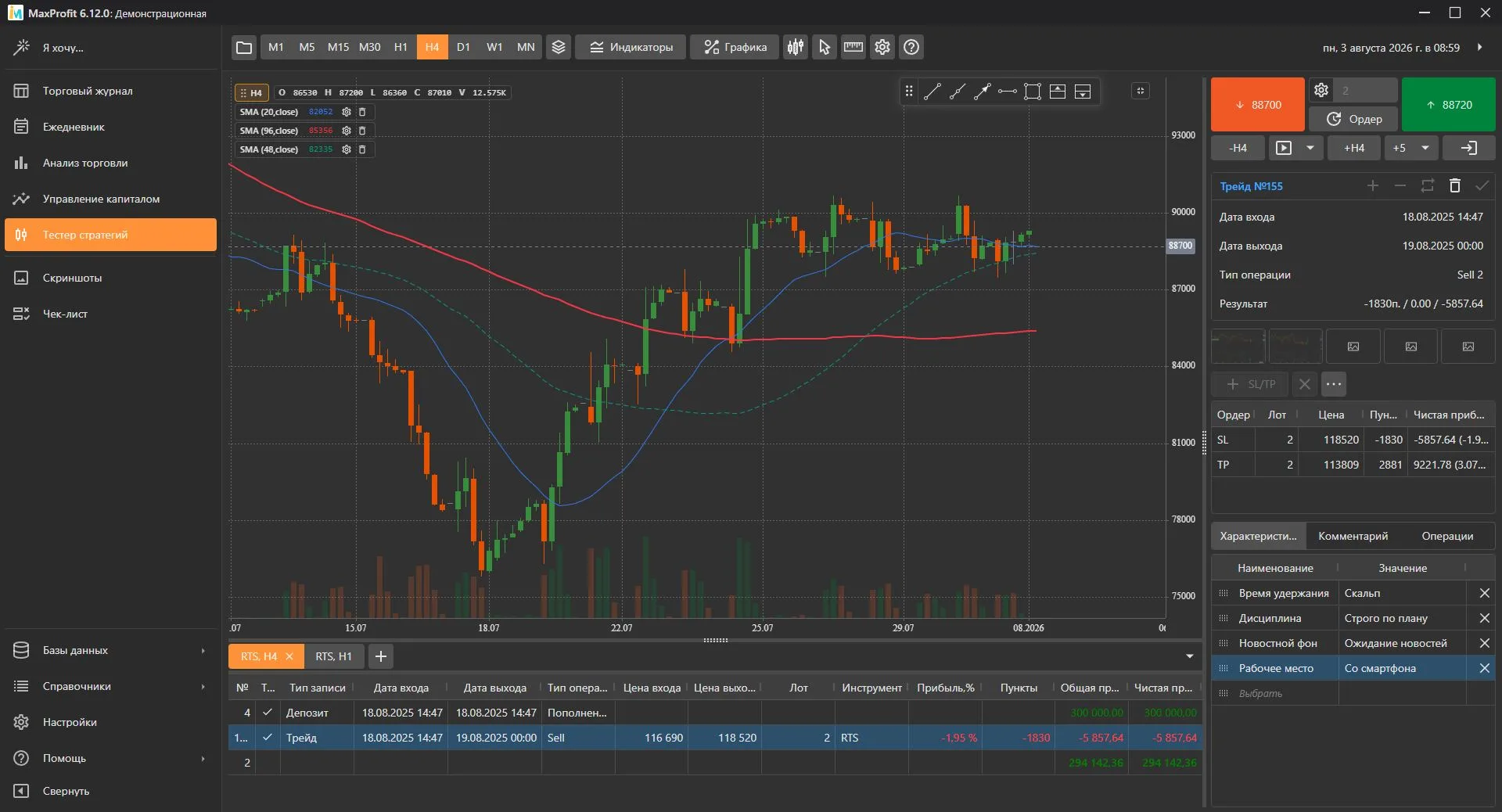
The MaxProfit Strategy Tester is a full trading platform in “time-machine” mode. Rewind the history of any instrument bar by bar, trade from the chart like in a live terminal and refine strategies in a risk-free environment down to the tick. The best way to turn an idea into a proven skill — before you risk real money.
Time machine for the market
Rewind history years back and trade day by day as if it’s happening right now. Step one bar, step any period, jump to a specific date — all in one click. The chart reveals itself the way a trader saw it at that moment: no peeking into the future.
Real-time playback
Press Play and the chart comes alive — bars appear at an adjustable speed, from glacial to lightning. The simulation is as close to a real session as it gets: you have time to think, judge, click. Ideal for training decision-making speed.
Trade directly from the chart
Buy and sell with one button, place pending orders, stops and takes by clicking right on the candles. Open positions, orders and SL/TP lines show on the chart as markers and lines — completely visual. You train the exact skill you’ll use in a live terminal.
Instrument list
Test strategies and analyze trades using quotes for 0 instruments from exchanges around the world — from stocks and futures to crypto, forex pairs and bonds.
Nothing found
Try a different query. If the instrument is missing, let us know — or create your own and upload custom quotes for it.
Technical indicators
The system ships with 109+ ready-made indicators for building strategies. Find what you need, import from TradingView or create your own.
SMA
Simple moving average
EMA
Exponential moving average
WMA
Weighted moving average
SMMA
Smoothed moving average
DEMA
Double exponential moving average
HMA
Hull moving average
KAMA
Kaufman adaptive moving average
TEMA
Triple exponential moving average
TRIMA
Triangular moving average
VWMA
Volume-weighted moving average
ZLEMA
Zero-lag exponential moving average
Bollinger Bands
Bollinger Bands around a moving average
Bollinger Bands Width
Width of Bollinger Bands (%B)
Adaptive Moving Average
Adaptive smoothing by efficiency ratio
Alligator Williams
Bill Williams Alligator (3 smoothed MAs)
DeMarker
Tom DeMark oscillator
Donchian Channels
Channel of period high and low
Envelope
Percentage channel around price
Keltner Channel
Volatility channel based on ATR
Linear Regression Channel
Regression line with ±σ bounds
Parabolic SAR
Parabolic stop-and-reverse system
Bull Bear Power
Elder bull and bear power
MACD
Moving average convergence/divergence
Random Index (KRI)
Kaufman random index
RSI
Relative strength index
BIAS
Price deviation from a moving average
BRAR
BR / AR market sentiment indicator
CCI
Commodity Channel Index
DMI
Directional Movement Index (+DI / −DI)
Current Ratio
Ratio of current price to mean
PSY
Psychological line
DMA
Difference of moving averages
TRIX
Triple exponential moving average rate
OBV
On-Balance Volume
Volume Ratio
Ratio of up to down volume
Williams %R
Williams Percent Range
Momentum
Speed of price change
Ease of Movement
Ratio of volume to volatility
ROC
Rate of Change
PVT
Price-Volume Trend
Awesome Oscillator
Bill Williams Awesome Oscillator
A/D
Accumulation/Distribution line
ADX
Average Directional Index
APO
Absolute Price Oscillator
Aroon
Aroon Up / Down trend strength
ATR
Average True Range
Average Price
Average bar price (O+H+L+C)/4
Balance of Power
Balance of buyer vs seller strength
CMO
Chande Momentum Oscillator
Chaikin Volatility
EMA of the high-low range
Linear Decay
Linearly decaying weight
Directional
Directional indicator
Detrended Price
Detrended Price Oscillator
Exponential Decay
Exponentially decaying weight
Fisher Transform
Fisher Transform of price
Forecast Oscillator
Forecast oscillator from linear regression
KVO
Klinger Volume Oscillator
MFI (BW)
Bill Williams Market Facilitation Index
Mass Index
Reversal search via high-low range
Maximum in Period
Maximum over period
Minimum in Period
Minimum over period
Mean Deviation
Mean absolute deviation
Median Price
Median bar price (H+L)/2
Money Flow Index
Volume-weighted RSI
NATR
Normalized Average True Range
NVI
Negative Volume Index
PVI
Positive Volume Index
PPO
Percentage Price Oscillator
QStick
QStick momentum (open to close)
Standard Deviation
Standard deviation
Standard Error
Standard error
True Range
Bar true range
Stochastic
Stochastic Oscillator (%K / %D)
Sum Over Period
Sum of values over period
Time Series Forecast
Linear regression forecast
Typical Price
Typical bar price (H+L+C)/3
Ultimate Oscillator
Larry Williams Ultimate Oscillator
Variance Over Period
Variance over period
VHF
Vertical Horizontal Filter
VIDYA
Variable Index Dynamic Average
AHV
Annual historical volatility
Volume Oscillator
Fast vs slow MA of volume
Weighted Close Price
Weighted bar price (H+L+2C)/4
Wilder's Smoothing
Wilder's smoothing (RMA)
Acceleration Bands
Volatility-adjusted price bands
ALMA
Arnaud Legoux moving average
Chandelier Exit
ATR-based trailing stops
CMF
Chaikin Money Flow
Elder Force Index
Alexander Elder Force Index
KST
Know Sure Thing (Pring)
PFE
Polarized Fractal Efficiency
RMI
Relative Momentum Index
RMTA
Recursive Moving Trend Average
Since Change
Bars since last significant change
Vortex
Vortex indicator (VI+ / VI-)
PVO
Percentage Volume Oscillator
Projection Oscillator
Mel Widner Projection Oscillator
Ulcer Index
Volatility via drawdowns
Volume Price Trend
Cumulative volume × price change
VWAP
Volume-weighted average price
Ichimoku Cloud
Ichimoku Kinko Hyo (5 lines + cloud)
Pivot Points
Classic / Fibo / Camarilla levels
Supertrend
ATR-based trend indicator
Stochastic RSI
Stochastic of RSI
Williams Fractals
Bill Williams reversal fractals
Gator Oscillator
Complement to the Alligator
ZigZag
Market zigzag filter
Squeeze Momentum
Squeeze Momentum by LazyBear
Coppock Curve
Long-term momentum oscillator
TradingView import
Already have working Pine Script strategies? Our built-in converter helps you adapt TradingView logic for the MaxProfit tester.
How-toJavaScript API
Write custom indicators in JavaScript. Direct access to candles, ticks and math helpers. Plug in neural networks and any external npm libraries.
DocumentationReports
MaxProfit Reports turn your trading history into clear statistics and charts. Dozens of ready-made report types, flexible filters and periodicity — equity curve, profit factor, breakdowns by instrument, strategy, time, day of week and custom tags. See where you actually earn and where you lose — and make decisions based on numbers, not feelings.
Equity curve
Visualize account growth over time: net profit, gross profit, percentages, pips — your choice. Compare several series on one chart and see long drawdowns next to growth periods. One glance and you understand the “health” of your trading for a month, a quarter, a year.
Balance dynamics
Account balance change by day, week, month or year. The chart shows period results rather than cumulative totals — which stretches made you money and which took it away. The seasonality of your own trading becomes obvious.
Trade dynamics
Number of trades made across any period. Spot when you overtrade and when you sit out — and compare that to your financial result. The discipline of entry frequency gets measured in numbers, not feelings.
Artificial intelligence in MaxProfit
The built-in AI analyzes your trading, highlights mistakes you don’t notice and suggests ways to improve your strategy based on mathematical statistics.
Smart AI-powered trade analysis
Ask questions about your trading in plain language. The AI analyzes your trades and journal metrics and gives concrete, math-backed advice for improvement.
- Tilt-pattern detection and psychology tips
- Finding the best times and days to trade
- Spotting weak spots in your strategy
Why did my strategy start losing money this week?
I analyzed your last 42 trades. You started ignoring the stop-loss rule on high-volatility assets.
On top of that, 80% of your losses came during the London session open. I’d recommend lowering risk per trade to 0.5% during that window.
Show the loss distribution
Trader Diary
The trader diary is your personal space to capture thoughts, observations and trading decisions. Write down anything that matters: from a morning market review to a post-close mistake breakdown. Turn the chaos of trading impressions into systematic experience that actually moves your results.
Full-featured text editor
A rich WYSIWYG editor with formatting, fonts, colors, alignment, lists and tables — everything you’d expect from a familiar office tool. Build structured notes at any depth: from short jot-downs to detailed trading plans with sections and styling. No limits on how you express your ideas.
Screenshots and images right inside notes
Take chart screenshots in one click and drop them straight into a note — no third-party tools, no clipboard relay. Pasting existing images from disk works too, plus a built-in viewer and markup editor. Your visual observations are always at hand and in the right context.
Link notes to trades
Bind diary entries directly to specific trades from the journal — one click on the link opens the full trade card. Analysis, entry reasons, emotions, mistakes — all permanently attached to the actual trade they belong to. This turns the diary into a living knowledge base, not a pile of disconnected text.
Capital Management
Risk management applied to your own trades. MaxProfit takes your history and shows where your current risk per trade actually leads — not textbook advice, but a calculation on your statistics, including the probability of losing the account.
Risk of ruin
The probability of losing your account at the current risk per trade, computed from your own statistics: win rate, average win and average loss. Raise risk from 1% to 2% and see how many times more likely ruin becomes.
Monte Carlo: same statistics, different order
Your trades are replayed a thousand times in random order, showing the distribution of maximum drawdown from the best runs to the worst — and where your actual drawdown falls within it. Three losses in a row and three spread apart are the same statistics but a different account.
Comparing models: profit is the wrong column
Seven models on the very same history of your trades, with an “As it was” row for your real trading. The key column is not profit but the share of ruins: a model that wipes the account in even a few percent of reshuffles is unusable, whatever its bottom line.
What traders say
Real stories from MaxProfit users.
“The most important thing for me is that the diary with my honest thoughts about trades lives on my computer, not in the cloud. What I write after a losing session is for me alone. MaxProfit is the only tool I've found that takes that seriously.”
Adam Whitaker
Day trader, US equities
Your data stays on your computer.
Unlike any online service, MaxProfit stores your entire trading history exclusively on your computer. No one but you has access to it.
MaxProfit is a desktop program, not an online service. The journal, backtests, notes and broker keys stay with you, in a database file on your disk. Your strategy is your intellectual property.
- Local database on your computer
- Works without a constant internet connection
- Full export and backup in one click
Your data stays with you
Your keys. Your data. Your profit.
Today’s deal: −16% off all plans
Start trading systematically today — the discount is valid only until midnight.
What we’re working on
We keep evolving MaxProfit. Here’s what’s coming in the next updates.
AI analysis assistant
A smart helper that finds patterns in your mistakes and generates personalized suggestions.
TradingView support
Import strategies and indicators from TradingView, including a Pine Script converter.
macOS & Linux versions
Native clients for Apple Silicon and Linux distributions, no performance loss.
JavaScript indicator API
Write custom indicators in JavaScript with direct access to candles, ticks and math functions.
Didn’t find what you were looking for?
Tell us. More than 70% of new features in MaxProfit come from suggestions by our community of traders.
Suggest an ideaSimple, straightforward pricing
Quarterly
3-month license
For getting started with the basics
- Full access to all modules: journal, tester, reports, diary
- 90 days of free updates
- Standard support (24-hour response)
Annual
1-year license
For continuous trading
- Everything in the 3-month plan
- Cloud sync (2 devices)
- TradingView indicator import
- Custom JavaScript indicators (soon)
- Priority support (8-hour response)
Lifetime
Lifetime license
For professional traders
- Everything in the annual plan
- Cloud sync (3 devices)
- Upload your own quotes for backtesting
- Early access to beta releases
- AI analysis assistant (soon)
- Lifetime updates
- VIP support (2-hour response)
Demo version
The demo gives you full functionality, limited only by a 15-day trial period and/or a maximum of 50 trades in the journal.
Detailed plan comparison
Compare features to pick the right option
| Feature | Demo | 3 months | 1 year | Lifetime |
|---|---|---|---|---|
Access duration How long the program will run on your computer. | 15 days | 90 days | 365 days | Forever |
Free updates Period during which you receive free program updates. | 15 days | 90 days | 365 days | Forever |
Trade journal Import, manage and analyze all trades. | ||||
Strategy tester Risk-free strategy testing on historical data. | ||||
Reports and analytics Dozens of ready-made reports: equity curve, profit factor, breakdowns by instrument and strategy. | ||||
Trading diary Personal notes with screenshots, linked to trades. | ||||
Capital management Risk and position sizing, drawdown simulations and comparison of money-management models. | ||||
Supported brokers and platforms Trade import from MT4/MT5, cTrader, NinjaTrader, IBKR and hundreds of brokers. | 800+ | 800+ | 800+ | 800+ |
Technical indicators Ready-made indicators for building strategies. | 100+ | 100+ | 100+ | 100+ |
Drawing tools Lines, channels, Fibonacci, Pitchfork, Gann, ABCD, Elliott waves and others. | 50+ | 50+ | 50+ | 50+ |
Instruments available for testing Quotes from exchanges around the world for backtesting. | 55,000+ | 55,000+ | 55,000+ | 55,000+ |
Custom columns and tags Add your own fields to tag trades by setup, emotion, market phase. | ||||
Conditional row formatting in the journal Highlight trades with colors based on any conditions. | ||||
Multiple trading accounts in one journal Track stock, brokerage and crypto accounts at the same time. | ||||
Priority support Response time from technical support. | 24 hours | 8 hours | 2 hours | |
Cloud device sync Sync data between your computers via your own cloud (Google Drive, Dropbox, etc.). | 2 devices | 3 devices | ||
Custom JavaScript indicators (soon) API to write your own indicators in JavaScript. | ||||
TradingView indicator import Pine Script converter to import scripts from TradingView. | ||||
Upload your own quotes Import CSV with your data to test custom instruments and timeframes. | ||||
Early access to beta releases Receive new versions on a priority basis. | ||||
AI analysis assistant (soon) A smart helper that finds patterns in your mistakes and gives personal advice. | ||||
Still have payment questions? Check our FAQ section or contact support.
What’s new?
All newsSuggest an idea for MaxProfit
Much of what MaxProfit is today came from trader suggestions — from specific broker integrations to whole modules. Tell us what you’re missing or what you’d like to see.
We read every message and try to respond within a few days. If your idea fits our roadmap, it lands in one of the next releases.
Frequently asked questions
Still have questions? We collected answers to the most common ones.
MaxProfit — your entry point!
Download the free 15-day demo version and take absolute control of your trading results.